



pulse2percept 0.11.0.dev0 documentation
Globally, an estimated 43 million people are blind, with limited treatment options available for many causes of vision loss. For certain conditions, visual neuroprostheses - such as retinal and cortical implants - may be the only viable intervention.
However, understanding the perceptual experience generated by these devices remains a significant challenge. The artificial vision they provide is shaped by complex interactions between neural stimulation, underlying neurophysiology, and device-specific parameters.
pulse2percept (p2p) is an open-source Python package that offers spatiotemporal models of common retinal and cortical implants, providing a computational framework to simulate and study artificial vision.
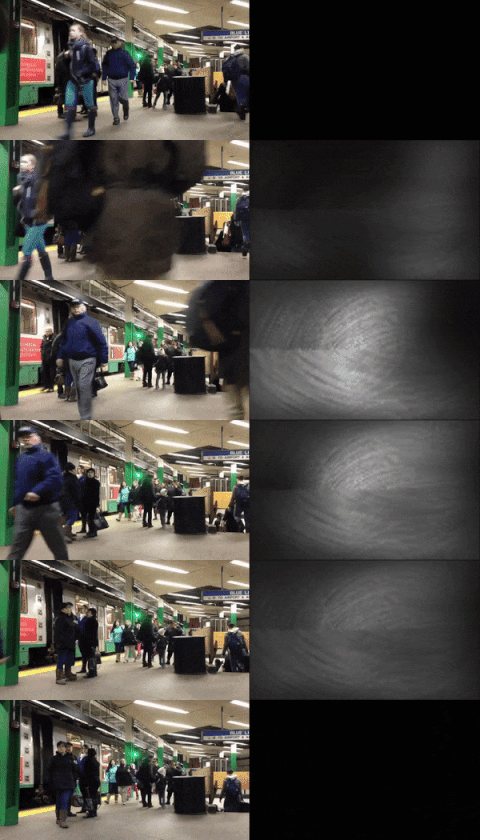
(left: input stimulus, right: predicted percept)
Simulations such as the above are likely to be critical for providing realistic estimates of prosthetic vision, thus providing regulatory bodies with guidance into what sort of visual tests are appropriate for evaluating prosthetic performance, and improving current and future technology.
If you use p2p in a scholarly publication, please cite as:
M Beyeler, GM Boynton, I Fine, A Rokem (2017). pulse2percept: A Python-based simulation framework for bionic vision. Proceedings of the 16th Python in Science Conference (SciPy), p.81-88, doi:10.25080/shinma-7f4c6e7-00c.
Installation
To install the stable release of p2p, run:
pip install pulse2percept
To install the current development version directly from GitHub:
pip install git+https://github.com/pulse2percept/pulse2percept
pip installs NumPy and the other dependencies for you, and will only select
a release that supports the Python version you are running (see
Compatibility and Building from Source).
Compatibility
Python |
3.14 |
3.13 |
3.12 |
3.11 |
3.10 |
3.9 |
3.8 |
3.7 |
|---|---|---|---|---|---|---|---|---|
p2p 0.11 Residual Vision |
Yes |
Yes |
Yes |
Yes |
||||
p2p 0.10 Encoders |
Yes |
Yes |
Yes |
Yes |
||||
p2p 0.9.1 |
Yes |
Yes |
Yes |
Yes |
||||
p2p 0.9 Cortex |
Yes |
Yes |
Yes |
Yes |
||||
p2p 0.8 Retina |
Yes |
Yes |
Yes |
Yes |
Prebuilt wheels are available for 64-bit Linux, macOS 11 and later
(Apple silicon and Intel), and 64-bit Windows. On other platforms, pip may
build pulse2percept from source, which requires a C compiler. NumPy, Cython,
and other build dependencies are installed automatically.
Our GitHub Action Runners test the current release on Linux, macOS, and Windows for every supported Python version listed above.
Where to go from here
Start with the Getting Started guide.
Explore the Example Gallery for complete simulations and use cases.
Learn about visual implants, electrical stimuli, and our computational models.
Check the FAQ for common questions.
Request features or report bugs on the Issue Tracker.